
Ubiquiti devices are great.
They could be amazing if you can add stuff missing, like TPROXY support in iptables.
Here is a tutorial on how you could compile a single module that can be installed into your ubiquity devices.
In this article, I'm going to compile the missing tproxy module for iptables as an example.
Prepare environment
System
Debian 10 (buster) is preferred, although Debian 7 (stretch) can do the same job.
Debian 8 and 9 are not ideal for this task since gcc for mips is missing in their respective repos.
add
deb http://packages.debian.org/debian/ buster main
deb-src http://packages.debian.org/debian/ buster main
to your /etc/apt/source.list if it is not there.
For Debian 7:
deb http://packages.debian.org/debian/ oldstable main
deb-src http://packages.debian.org/debian/ oldstable main
is what you need.
Compilers
Install all the required compile tools withapt install -y autoconf automake libtool gettext pkg-config g++-mipsel-linux-gnu gcc-mipsel-linux-gnu g++-mips64-linux-gnuabi64 gcc-mips64-linux-gnuabi64 build-essential upx
Environment variables
Create a shell script and paste
export ARCH=mips
export host=mipsel-linux-gnu
export strip=mipsel-linux-gnu-strip
export CROSS_COMPILE=mipsel-linux-gnu-
You don't need to apply the executable attribute to it.
Apply it to the current console with source you.file.sh
Get the source
Figure out the router version
Login to your router and check the firmware version. It should be displayed on the top left of the page.
Once you know the version number (and device model of course), head over to DOWNLOAD SECTION, find the version you're on, and make sure you clicked the right link.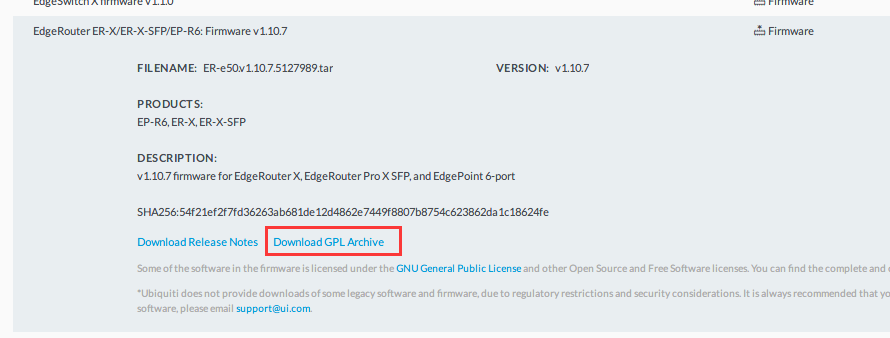
The archive could be huge, ~500MB+ or you're downloading the wrong thing.
Get the kernel source
Open the archive with an archiver and look for a file with kernel in its name.
Extract it and copy it to your prepared linux environment.
Once you get it there and have set up a warm home for it, extract it by tar -xf kernel-source-archive-filename.tgz.
Let's presume you put the kernel in /usr/local/kernel/kernel
Compile
Prepare for the module
Create another folder for your module and copy all required files into it.
I created /usr/local/kernel/tproxy for my module and copied kernel/net/netfilter/xt_TPROXY.c into it.
Create a makefile for it. It's unbelievably simple.
obj-m:=xt_TPROXY.oThat's it.
Prepare for compiling
CD to the kernel folder and do make oldconfig && make prepare && make scripts
This should be enough to generate everything required to compile a module.
No question should be prompted. If it does, you set your environment variable incorrectly and you are compiling the source for your current Linux.
Compile the module
Now, the most exciting part: Compiling
make -s -C ../kernel/ ARCH=mips CROSS_COMPILE=mipsel-linux-gnu- M=`pwd` EXTRA_CFLAGS+=-fno-pie modulesChange the ../kernel/ part accordingly to the position you rest your kernel source in.
If everything is right, a xt_TPROXY.ko file should be in the same folder you're in. Copy it to your router or other types of devices.
Install mod
Install and load the module
The rests are simple.
- Copy the
.kofile to where it should be (/lib/modules/{kernel version}/kernel/net/netfiler/in my case) - run
insmod /absolute/path/to/your/kofileto install it - run
depmodto deploy it - run
mobprobe yourkoto load it.
Congratulations! You made it.
There is another easier way to make modules but limited to the builtin modules only. For third-party modules or modules you write, You have to follow the method above mentioned.
This method is very simple:
make oldconfig && make menuconfigThis will make a sample .config for kernel and pops up a config dialog to fiddle the kernel options.
Load the .config via load button and tick all the modules you want to build. Remember to set the compiling status to <M> instead of <*> which will build modules into the kernel instead of a separate .ko file.
Save your new .config and run make modules.
It will take a while and you'll find a lot of .ko files in their respective folders.



0 comment